
Pack your music twice, your headphones twice, every cable your setup needs and a few small things that save a night. Then ask the promoter the right questions a week before, so nothing in the booth surprises you. Here is the checklist, for any app and any gear.
Music: two copies, the right format
- Two or more USB sticks with the same export. Sticks fail, get left in a player, or are needed in two places in a back to back. Export the same playlists to each from your DJ app, since players need the library it writes (playlists, beatgrids, cues), not just files: see Laptop or USB stick?
- SD cards only if you know the players. The CDJ-3000, the older CDJ-2000NXS2 and the Denon DJ SC6000 take SD cards, but AlphaTheta's newer CDJ-3000X does not list them among its media.
- The right file system (the way the stick is formatted). FAT32 is on every list we checked. The CDJ-3000X and CDJ-1500X read FAT16, FAT32, exFAT and HFS+ (an older Mac format), the CDJ-2000NXS2 FAT16, FAT32 and HFS+, and Denon DJ lists exFAT and FAT32 for the SC6000. NTFS is on none of these lists. For exFAT, rekordbox lists nine AlphaTheta models as of July 2026, including the CDJ-3000, CDJ-3000X and XDJ-RX3; the CDJ-2000NXS2 is not one of them.
- The export step in your app. In rekordbox 7, update to the latest version as AlphaTheta asks, switch to Export mode, select your stick, right-click a playlist and choose Export Playlist: one export then plays on new and older AlphaTheta players. In Engine DJ Desktop, for Denon DJ and other Engine OS gear, use Sync Manager. In djay Pro for Mac or Windows, right-click a playlist and choose Add to USB Library. In VirtualDJ, right-click a list, choose Export, open the CDJ tab and pick your drive and player model. AlphaTheta lists Traktor support as coming. If your app cannot export for the booth's players, ask for a laptop space.
- A backup on your phone or in the cloud. AlphaTheta lists phones running rekordbox for iOS or Android among the CDJ-3000X's sources. Players with Wi-Fi reach the cloud: Dropbox on the Denon DJ SC6000, Dropbox and Google Drive through rekordbox CloudDirectPlay on the CDJ-3000X and CDJ-1500X, if the booth has internet. Anywhere, a 3.5 mm to RCA cable lets a phone play into a free line input when all else fails.
- Your laptop with the full library, if you play from one. It is also how you export a new stick at the venue.
Put your name on every stick. To keep their playlists tidy, see how to organize your DJ library.
Sound: headphones and ears
- Headphones, plus a spare pair or a spare cable. A broken cable should not end your set.
- Wireless headphones: charge them and pack a cable. They run on a battery, and many use a transmitter with its own. Our post on the AlphaTheta HDJ-F9 explains why a wired backup belongs in the bag.
- A 6.35 mm (1/4 inch) adapter. Headphone plugs come in two sizes, 6.35 mm and 3.5 mm. AlphaTheta says its DJM-900NXS2, DJM-A9 and DJM-V5 mixers take both, but you will not always know what the booth has. Keep the adapter on your plug or in a fixed pocket.
- Earplugs. You stand next to loud speakers for hours. Read hearing protection for DJs to choose a pair you can mix with.
Laptop or controller
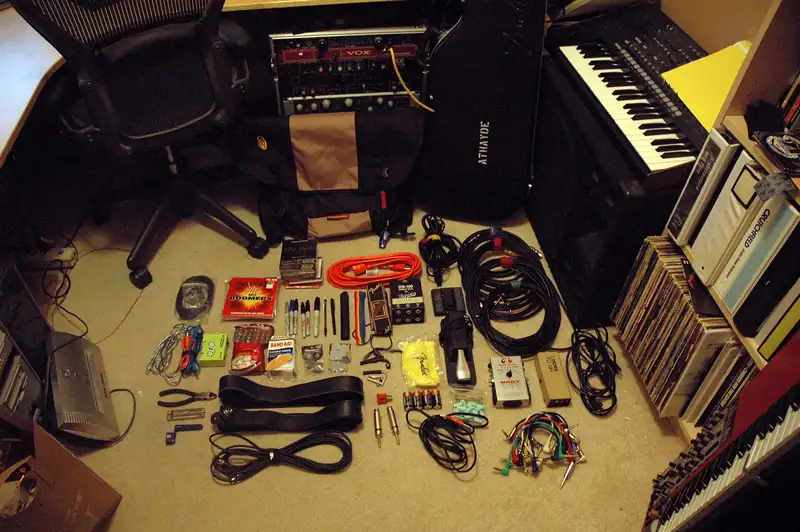
- Chargers: the laptop power adapter, the controller's power supply if it has one, a phone charger. The booth has sockets, not your cable.
- The right USB cables. Check which plugs your controller and laptop use (USB-A, USB-B or USB-C) and bring the cable or adapter that joins them, plus a spare.
- A USB hub, only if you need one. Serato's support page advises plugging your main DJ hardware straight into the laptop and using an externally powered hub only for extras. Never put a hub between a stick and a player: the CDJ-3000 manual says it does not support them.
- Audio cables (RCA, or whatever your controller's output needs) to reach a free line input on the house mixer.
- A power strip or extension cable. The nearest socket may not be near your table. Abroad, add a plug adapter.
- A laptop stand, to lift the screen to eye level and away from drinks.
Small things that save a night
- A pen light. Booths are dark, and sockets sit behind the gear.
- Gaffer tape, the cloth tape that comes off cleanly, to hold down a loose cable.
- A cleaning cloth for spilled drinks.
- Water for a hot booth.
- ID, for the door and the guest list.
- A note with your set times, the venue address and the promoter's number, on paper or in your phone.
- Cash or a card for the taxi home, and a charged phone.
Before the night: what to ask the promoter
Ask about a week before, in writing. Many DJs send a rider: a short list of the gear and conditions they need. No rider yet? Ask these.
- Set times. When you start and finish, who plays before and after you, and when you can get into the booth. Opening the night? Read what to play when you open for a big DJ.
- The gear list. Which players and mixer, by model and firmware version. It decides how you export: rekordbox's USB Export page puts newer AlphaTheta players (CDJ-3000X, CDJ-1500X, XDJ-AZ) on the OneLibrary format and older ones (CDJ-3000, CDJ-2000NXS2) on the older Device Library. And the CDJ-3000 reads exFAT only from firmware 1.20.
- Booth monitors. Is there a speaker in the booth for you, and who sets its level?
- A laptop space: a table or shelf, a free mixer channel, the cables to reach it and a power socket.
- Parking and load-in. Where to park or get dropped off, which door, what time.
- Guest list. How many names, and by when.
- Payment. The fee, cash or transfer, before or after the set, and whether they need an invoice.
- Recording. Can you record your set, and from which output?
After the night
- Pack everything. Check the players for your sticks, the headphone socket for your adapter, the floor for cables.
- Back up the recording. Copy the file to your computer and one more place before you edit it. Our guide to recording and posting DJ sets takes it from there.
- Write down what worked, and what did not, while you remember.
- Recharge and refresh. Charge your headphones and export new tracks to both sticks, ready for the next booking.
- Say thank you. A short message to the promoter the next day helps you get booked again.
The music still comes first. Plan it with how to prepare a DJ set, then open your style in all styles, play the 30-second previews and save tracks to your crate with the + button. Send to my DJ app exports your crate for your DJ software, one step from both sticks.
Sources: rekordbox (USB Export), rekordbox FAQ, AlphaTheta (CDJ-3000X specifications), Denon DJ (SC6000 specifications), Algoriddim (djay OneLibrary), VirtualDJ manual.