
Serato, the Auckland-based maker of Serato DJ, opened a public beta of Serato DJ 5.0 on September 9, 2026 (September 10 in New Zealand). The headline feature is Lucid Beatgrids, a rebuilt analysis engine that follows tempo changes inside a track, joined by Open Streaming and, in Serato DJ Pro, Cue Loops. Anyone with a Serato account can install the beta next to their current version, but there is no date yet for the final release.
Lucid Beatgrids: a grid that follows the music
A beatgrid is the row of markers your DJ software places on every beat. Sync, loops and beat jumps depend on it, so when the grid is off, your mix drifts. Serato says better beatgrids were its users' most requested improvement, and that Lucid Beatgrids bring automatic tempo tracking "for the first time". They work in both Serato DJ Pro and the free Serato DJ Lite.
- Flexible analysis is the new default. It maps tempo changes across the whole track and places markers where the beats really fall, on fixed-tempo tracks too.
- Fixed analysis stays, with much better detection of the downbeat (the first beat of each bar).
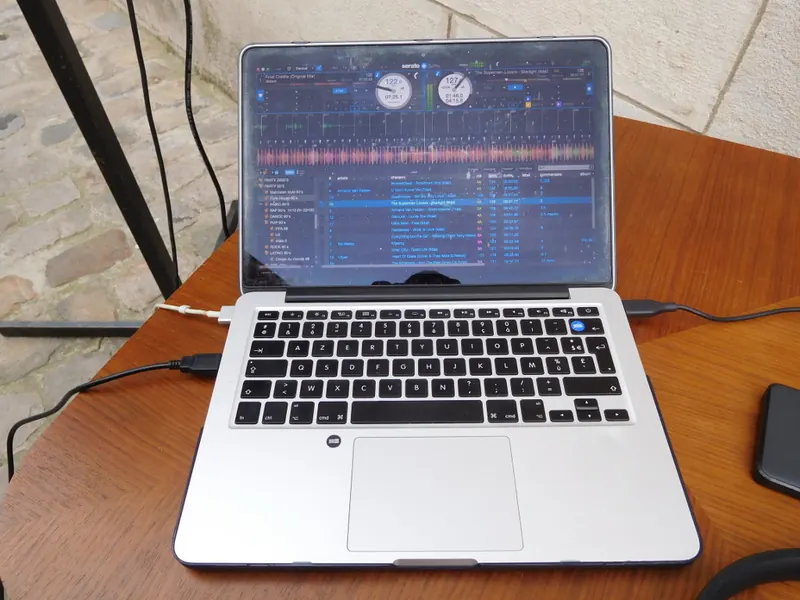
- BPM labels on the main and overview waveforms mark every tempo change. In the Setup menu you choose to show all of them, only the big ones, or none.
- Bars or beats: tempo changes sit on bars by default, which suits most genres. Switch to beats for the tightest sync on complex music.
- Two new editing tools: Set Grid Start pins where the grid begins, and Set Beat moves a single beat inside a bar without shifting the rest.
To get the new grids, re-analyze a track: right-click it and choose Analyze, or drag it onto Analyze Files. Serato says you only need to redo the tracks that need help, not your whole library. Your old grids are not overwritten: open your library in an older version and everything is as you left it.
Open Streaming, Cue Loops and smaller changes
Open Streaming lets you stay logged in to all your streaming services at once. Serato DJ works with Apple Music, Beatport, SoundCloud, Spotify and Tidal, each with its own subscription. In 5.0, every service gets its own crate, one crate can mix tracks from several services with your own files, and a dropdown next to the search bar searches each service. In Serato's words: "No more switching accounts mid-session." It comes to both Pro and Lite.
Cue Loops, for Serato DJ Pro only, put a hot cue and a loop on the same pad. One press jumps to the cue point and starts a loop at the length you set. Turn it on in the Setup menu, then start a loop, keep the playhead inside it and tap an empty cue slot.
The beta also includes:
- Protect Library, back again: when on, tracks cannot be removed from your library, crates or computer from inside the app.
- M3U and M3U8 playlist import, also back: drag in a playlist file, such as an export from other DJ software, Apple Music or Spotify, and Serato builds a crate from it.
- Key and BPM for streaming tracks as you browse, before analysis, on Beatport, Tidal, SoundCloud and Spotify (not yet Apple Music).
- Ready-made Tidal DJ playlists in Pro and Lite.
How to join the beta, and what to check first
The beta is open to everyone. Sign in with your Serato account on the Serato DJ 5.0 beta page, then download and install it. It installs alongside your current version, and Serato says your library and settings carry over. Before you start:
- Treat it as a test. Serato writes: "We recommend keeping your current version installed and not using the Beta for critical performances." The current stable version is Serato DJ Pro 4.0.10, released on September 25, 2026.
- Back up your library. Serato's backup guide explains what to copy with the app closed: the _Serato_ folder in your Music folder and on each external drive, the Serato Library folder, and your music files.
- Re-analyze in small batches. Start with the tracks that never sat right on the grid. If your library needs a tidy-up first, see our guide to organizing your DJ library.
Release date and prices
As of October 16, 2026, Serato has not announced a release date for the final Serato DJ 5.0, or said whether prices will change. For comparison only, version 4.0 opened as a public beta in August 2025, and Serato's download archive dates the final 4.0.0 to November 16, 2025.
Current prices on Serato's pricing page, which lists them in US dollars:
| Version | Subscription | Buy once | Includes |
|---|---|---|---|
| Serato DJ Lite | Free | Free | The free version to get started |
| Serato DJ Pro | $11.99 a month | $299 | DJ Pro on its own |
| Serato DJ Suite | $14.99 a month | $499 | DJ Pro, all Expansions (such as DVS for control vinyl, and Video) and Serato Studio |
Prices checked October 2026.
If your hardware unlocks Serato DJ Pro when connected, you do not need a license or subscription.
What the DJ press said
MusicRadar named classic funk, soul and disco tracks "not recorded to click track or DAW timeline" as examples that should get easier to play. We Are Crossfader called the handling of music without a rigid tempo one of the biggest long-running complaints about Serato, and said Cue Loops look like Serato "playing catch-up" with rekordbox, while welcoming the feature.
What it means for DJs
If you play older disco, funk, soul or hip hop, or live recordings, much of that music was played without a click track, so the tempo moves a little through the song. On a fixed grid, sync and loops slowly slide out of time. Serato sums up the problem as "that one track you love but never play" and "hours of manual editing". A grid that follows the drummer should make those records easier to sync and loop, and cut your prep time.
In practice: keep 4.x for gigs, try the beta at home on a few tracks you know drift, and watch the BPM labels before you trust sync. If you stream from more than one service, you no longer have to pick one before a set. M3U import also helps if you move playlists between DJ apps.
Serato is not alone here. rekordbox has a Dynamic analysis mode for tracks with big tempo changes, Traktor Pro 4 has flexible beatgrids that follow each tempo change, djay automatically picks a dynamic beatgrid for songs with tempo changes such as live drums, and VirtualDJ has a Fluid grid mode that adds beatgrid anchors when the tempo moves. Our DJ software comparison covers the main apps.
If disco is part of your sets, our House & Disco crate shows which tracks DJs play in that style, each with a 30-second official preview. Save tracks with the + button, then use Send to my DJ app to export your crate.
Sources: Serato, Serato pricing, MusicRadar, Sonicstate, Gearnews, We Are Crossfader.